
Change HTML Classes in JS
1. className
This is the older and simpler way to get or set the entire list of classes on an element.
Example():-
Adds a node to the end of a parent element.
<div id="box" class="red"></div>
  const box = document.getElementById('box');

  // Get the current class
  console.log(box.className); // "red"

  // Change the class completely
  box.className = 'blue';
Warning:
2. classList
This is the newer and more powerful way to get or set individual classes on an element. classList is a property that gives you methods to add, remove, toggle, and check for specific classes.
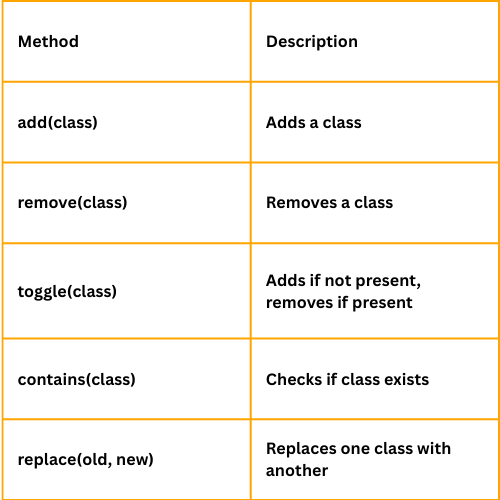
Example():-
<div id="box" class="red"></div>

    <script>
    const box = document.getElementById('box');

    // Add a class
    box.classList.add('shadow');

    // Remove a class
    box.classList.remove('red');

    // Toggle a class
    box.classList.toggle('hidden');

    // Check if it has a class
    if (box.classList.contains('blue')) {
      console.log('Box is blue!');
    }

    // Replace a class
    box.classList.replace('shadow', 'glow');
    </script>
Project: Light/Dark Mode Toggle using JS
Below is a simple example of how you can use classList to create a light/dark mode toggle using JavaScript.
Features :-
  <!DOCTYPE html>
  <html lang="en">
  <head>
    <meta charset="UTF-8" />
    <meta name="viewport" content="width=device-width, initial-scale=1.0"/>
    <title>Day/Night Mode Toggle</title>
    <style>
      /* Base styling */
      body {
        margin: 0;
        padding: 0;
        font-family: Arial, sans-serif;
        transition: background-color 0.3s, color 0.3s;
      }

      .container {
        height: 100vh;
        display: flex;
        flex-direction: column;
        align-items: center;
        justify-content: center;
      }

      button {
        padding: 10px 20px;
        font-size: 16px;
        cursor: pointer;
        margin-top: 20px;
        border: none;
        border-radius: 5px;
      }

      /* Light mode */
      .light-mode {
        background-color: #f0f0f0;
        color: #333;
      }

      .light-mode button {
        background-color: #333;
        color: white;
      }

      /* Dark mode */
      .dark-mode {
        background-color: #1e1e1e;
        color: #f0f0f0;
      }

      .dark-mode button {
        background-color: #f0f0f0;
        color: #1e1e1e;
      }
    </style>
  </head>
  <body class="light-mode">
    <div class="container">
      <h1>Day/Night Mode</h1>
      <button id="toggle-btn">Switch to Night Mode</button>
    </div>

    <script>
      const btn = document.getElementById('toggle-btn');
      const body = document.body;

      btn.addEventListener('click', () => {
        body.classList.toggle('dark-mode');
        body.classList.toggle('light-mode');

        // Update button text
        if (body.classList.contains('dark-mode')) {
          btn.textContent = 'Switch to Day Mode';
        } else {
          btn.textContent = 'Switch to Night Mode';
        }
      });
    </script>
  </body>
  </html>